Примеры DrawZero
На этой странице собрана галерея из 21 примера, которые поставляются вместе с библиотекой
DrawZero. Каждый блок ниже подтягивает код напрямую из каталога
src/drawzero/examples, поэтому вы видите ровно те же исходники, что и при установке
пакета. Используйте галерею как справочник: переходите от иллюстраций к коду, сверяйтесь
с комментариями в исходниках и экспериментируйте у себя в редакторе.
Используйте индекс ниже, чтобы быстро перейти к нужному примеру.
| Файл | Фокус | Ключевые идеи |
|---|---|---|
00_hello_world.py |
Первый рендеринг на холсте | Рисует холст с рамкой, разделяет текст на два языка и запускает цикл run(). |
01_grid_and_coordinates.py |
Обзор системы координат | Рендерит вспомогательную сетку grid(), затем аннотирует различные примитивы в известных координатах. |
02_loops_and_rgb_colors.py |
Искусство, управляемое циклом | Использует цикл for и случайные кортежи RGB для рисования вертикальных полос различной высоты. |
03_simple_objects.py |
Каталог примитивов | Демонстрирует каждый примитив рисования (линии, круги, повернутые прямоугольники, многоугольники, выравнивание текста). |
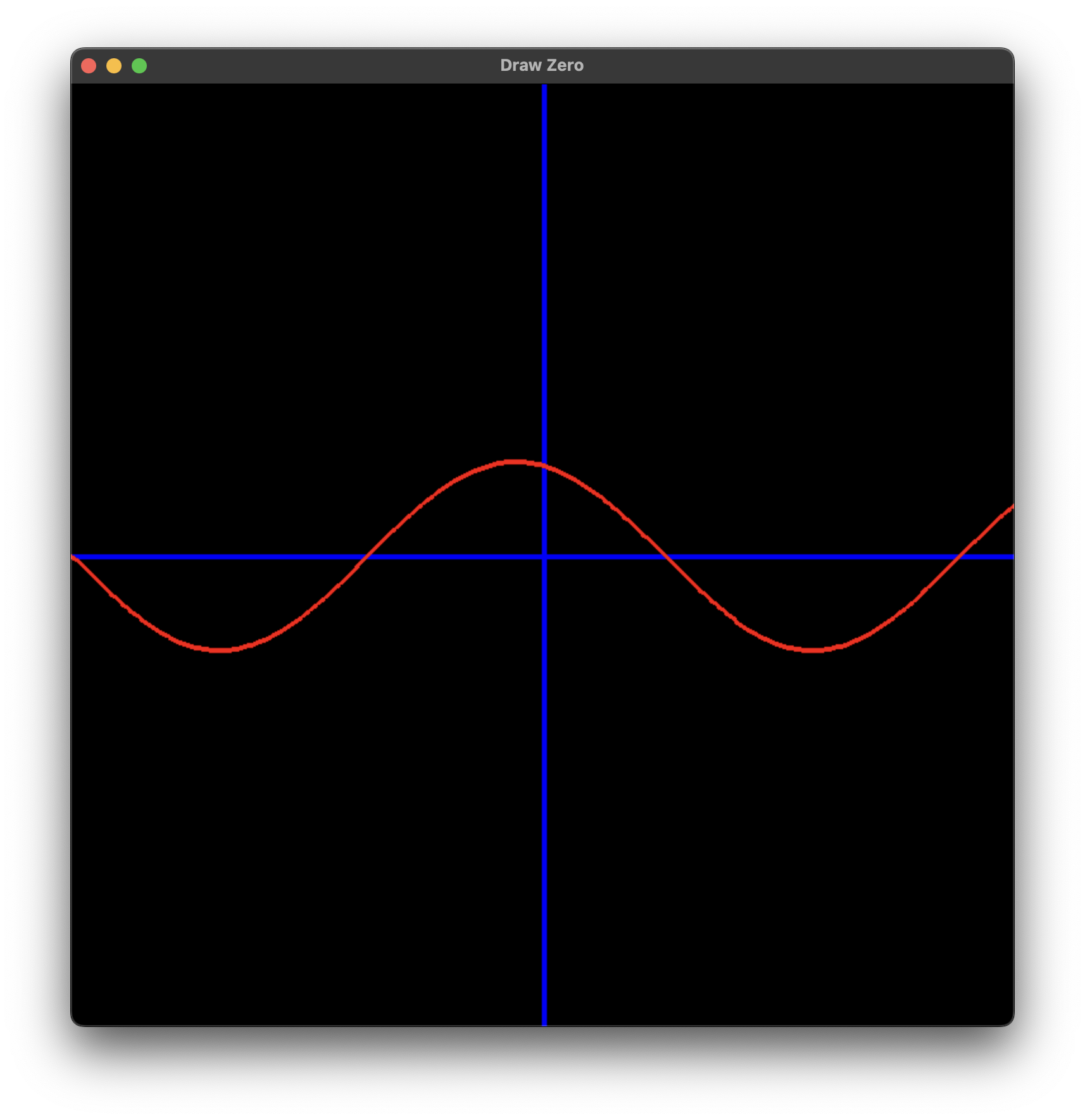
04_loops_sin_plot.py |
Построение математических графиков | Строит синусоиду, сшивая короткие отрезки линий вдоль оси X. |
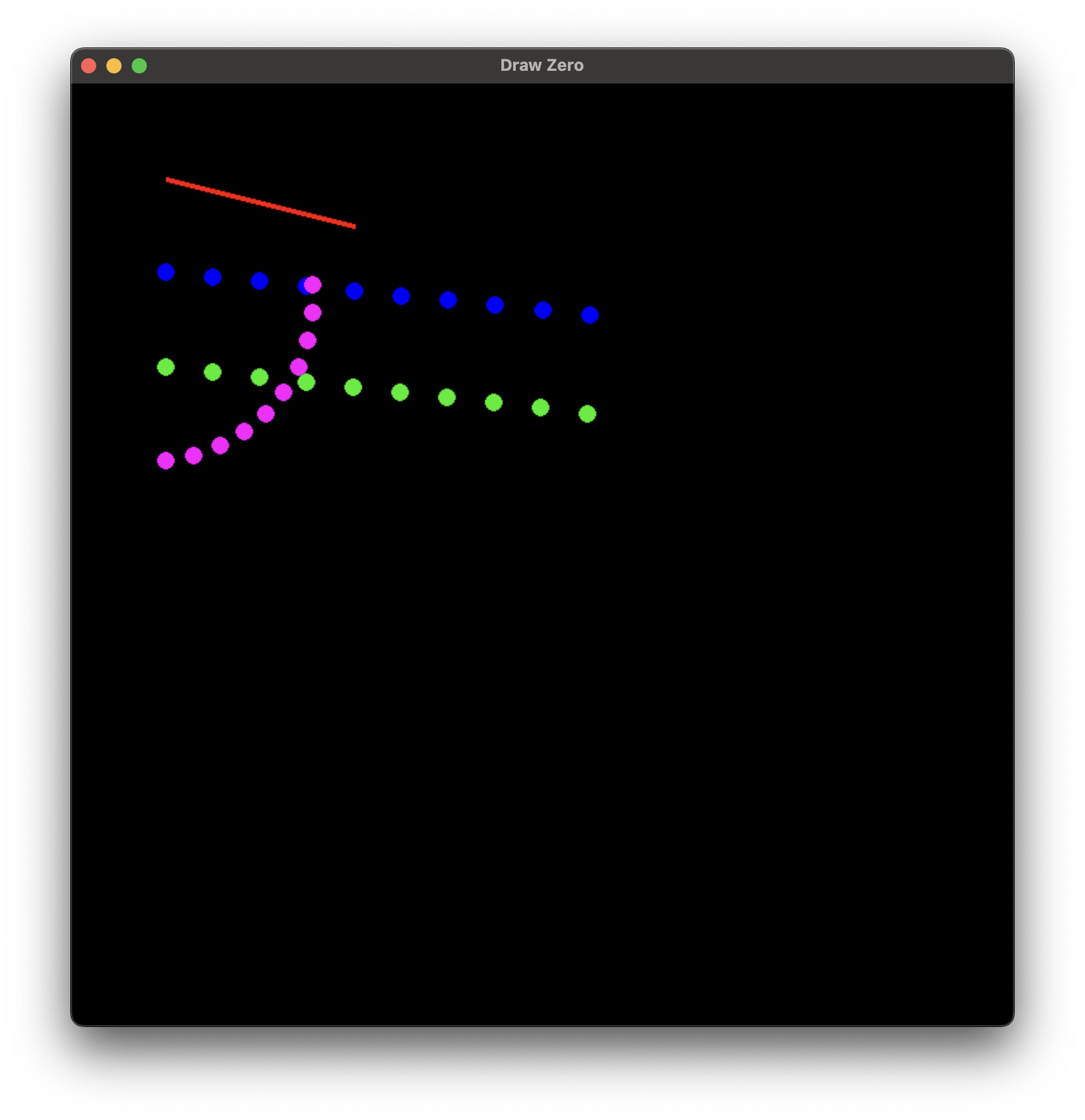
05_points.py |
Помощник Pt как вектор/черепаха |
Показывает, как класс Pt поддерживает арифметику, движение и вращение в стиле черепахи в циклах. |
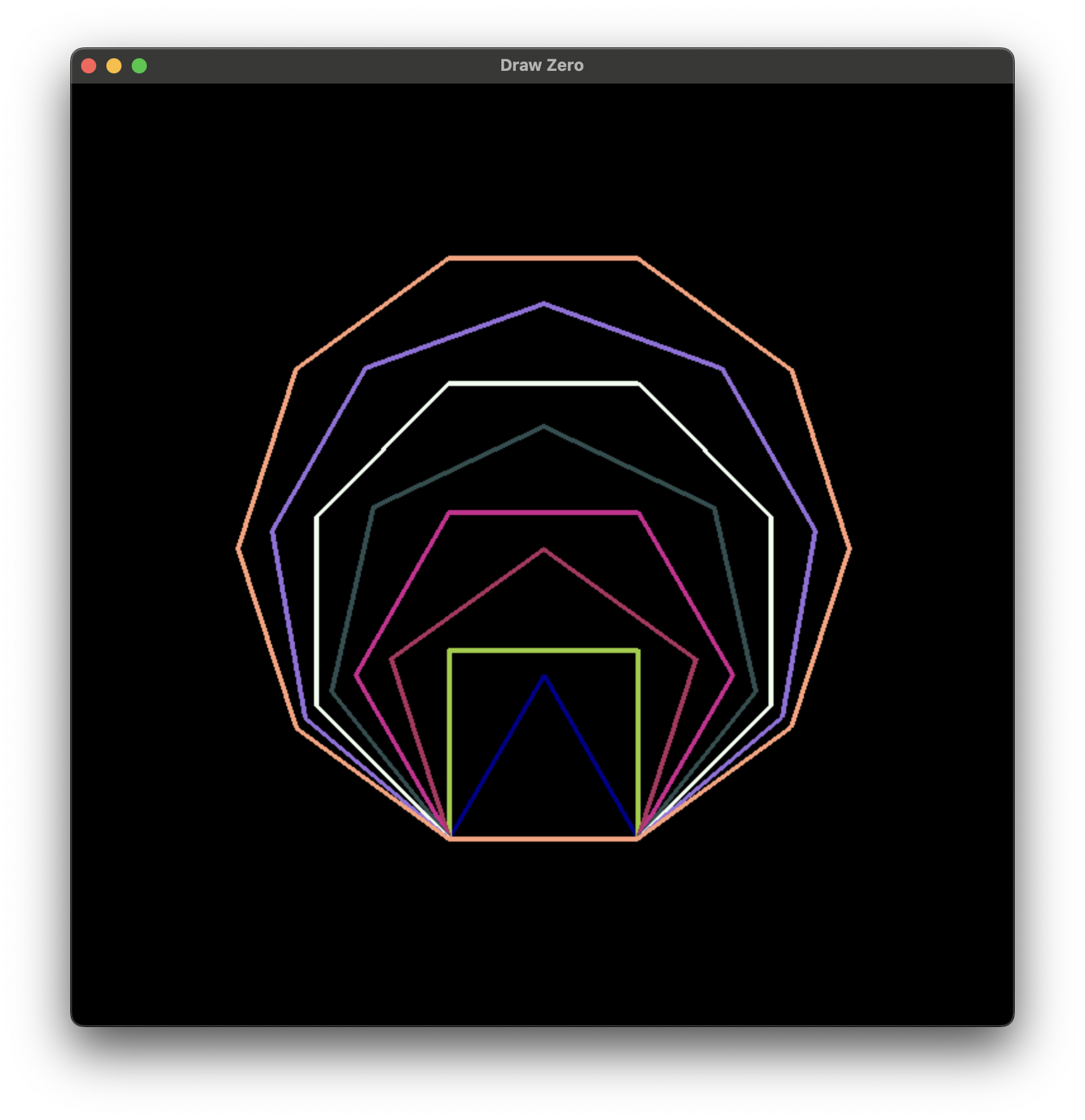
06_turtle_style.py |
Рисование многоугольников с помощью Pt |
Вращает экземпляр Pt для построения правильных многоугольников для сторон от 3 до 10 с использованием операций черепахи. |
07_animation_circles.py |
Минимальный цикл анимации | Изменяет положение, радиус и цвет круга с течением времени, вызывая tick() на каждом кадре. |
08_animation_traffic_light.py |
Анимация на основе состояний | Повторно использует помощника для рисования светофора и использует sleep() для переключения цветов. |
09_animation_rectangles.py |
Сложная анимация | Сочетает математику Pt с логикой вращения/орбиты, прозрачностью и условными эффектами. |
10_animation_planets.py |
Орбитальное движение | Вычисляет круговое движение для пары планета/луна и перерисовывает каждый кадр. |
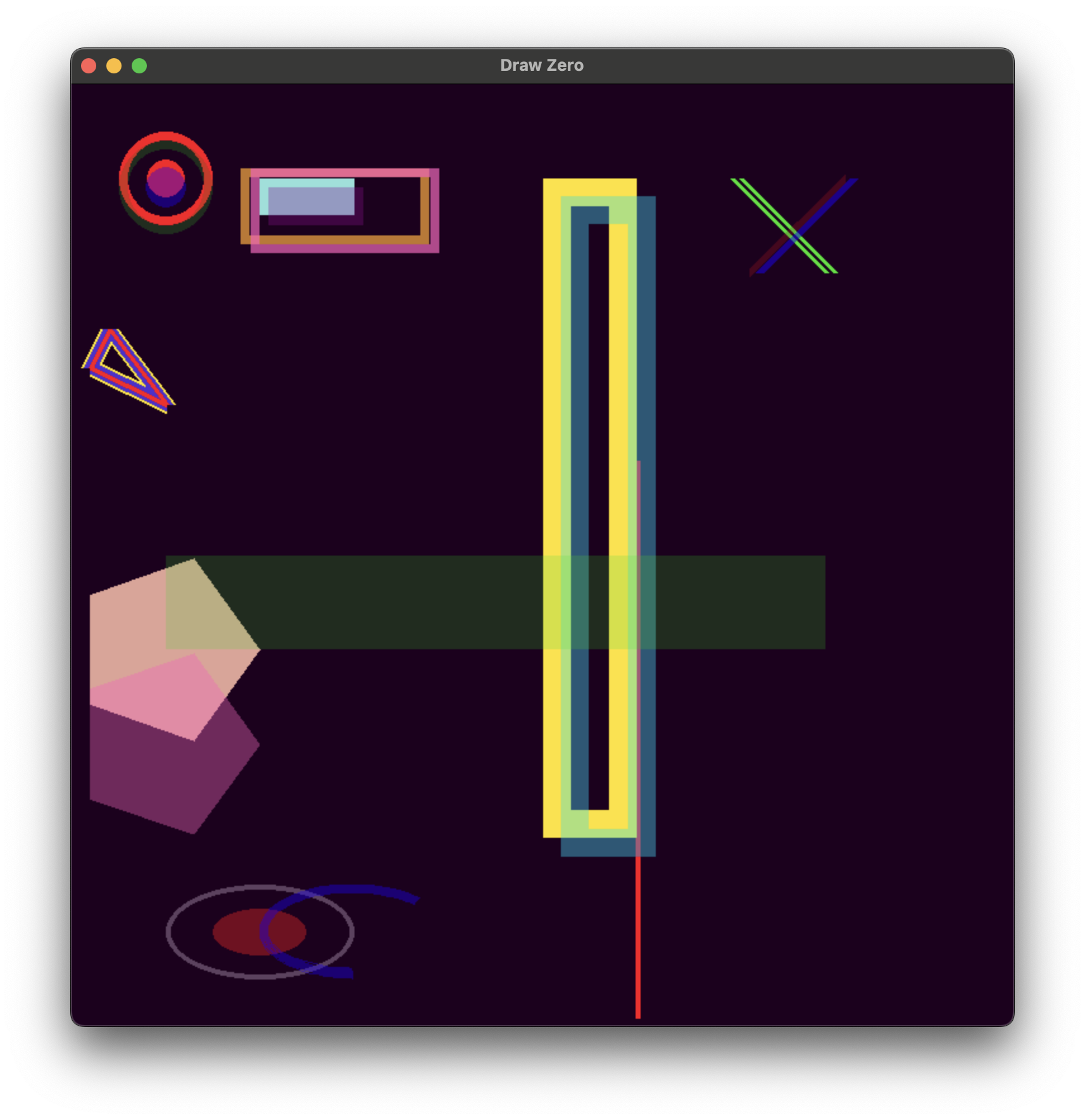
11_transparency_and_line_width.py |
Альфа-смешивание и толщина обводки | Демонстрирует различные значения альфа-канала и толщины линий на кругах, прямоугольниках, многоугольниках и эллипсах. |
12_images.py |
Рендеринг изображений | Загружает cat.png из папки примеров, демонстрирует масштабирование и альфа-канал при выводе изображений. |
13_gradients.py |
Помощник Gradient | Создает несколько шкал Gradient и визуализирует их с помощью сложенных прямоугольников. |
14_animation_close_vertex.py |
Анимация графа близости | Перемещает случайные узлы Pt с циклическим движением, рисует линии между соседними парами и использует оверлей FPS. |
15_animation_firework.py |
Система частиц | Реализует классы Particle и Firework с обновлениями физики, свечением на основе градиента и логикой очистки. |
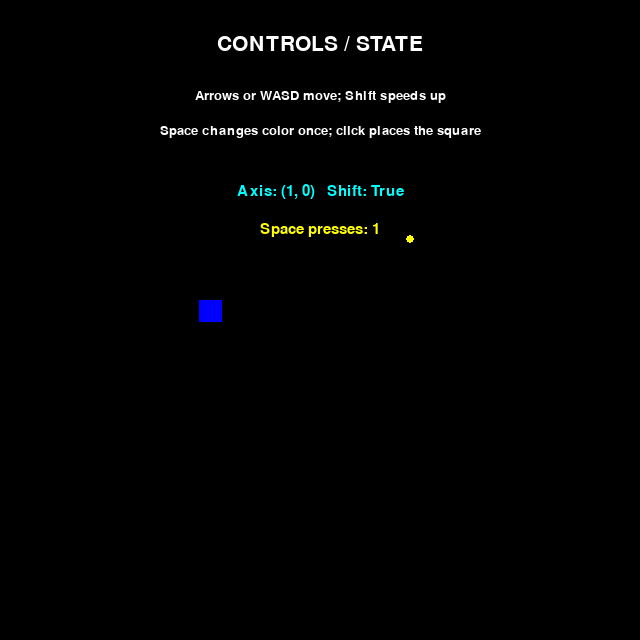
16_keyboard_and_mouse.py |
Обработка ввода | Использует оси, группы модификаторов, действия при нажатии и координаты в момент щелчка. |
17_mouse_tube.py |
Эффект следа мыши | Захватывает mouse.pos на каждом кадре, выращивает концентрические круги с градиентом по мере их старения. |
18_game_stars.py |
Мини-игра 3D-звездное поле | Использует датаклассы, случайные звезды и управление WASD/QE для навигации по псевдо-3D полю. |
19_game_colors.py |
Игра на реакцию | Отображает слова-цвета в сравнении с фактическими цветами, обрабатывает выбор кнопок мыши со штрафами по времени. |
20_game_racing.py |
Многопользовательская мини-игра | Назначает отдельные привязки клавиш для каждой машины, прокручивает предварительно вычисленную дорогу и ведет счет для каждого игрока. |
99_errors.py |
Демонстрация сообщений об ошибках | Принудительно вызывает ошибки проверки в режиме EJUDGE_MODE, чтобы продемонстрировать локализованную диагностику, выдаваемую конвертерами. |
Начало работы
Эти примеры показывают, как вывести первые примитивы на экран и разобраться с базовым
циклом run().
00_hello_world.py
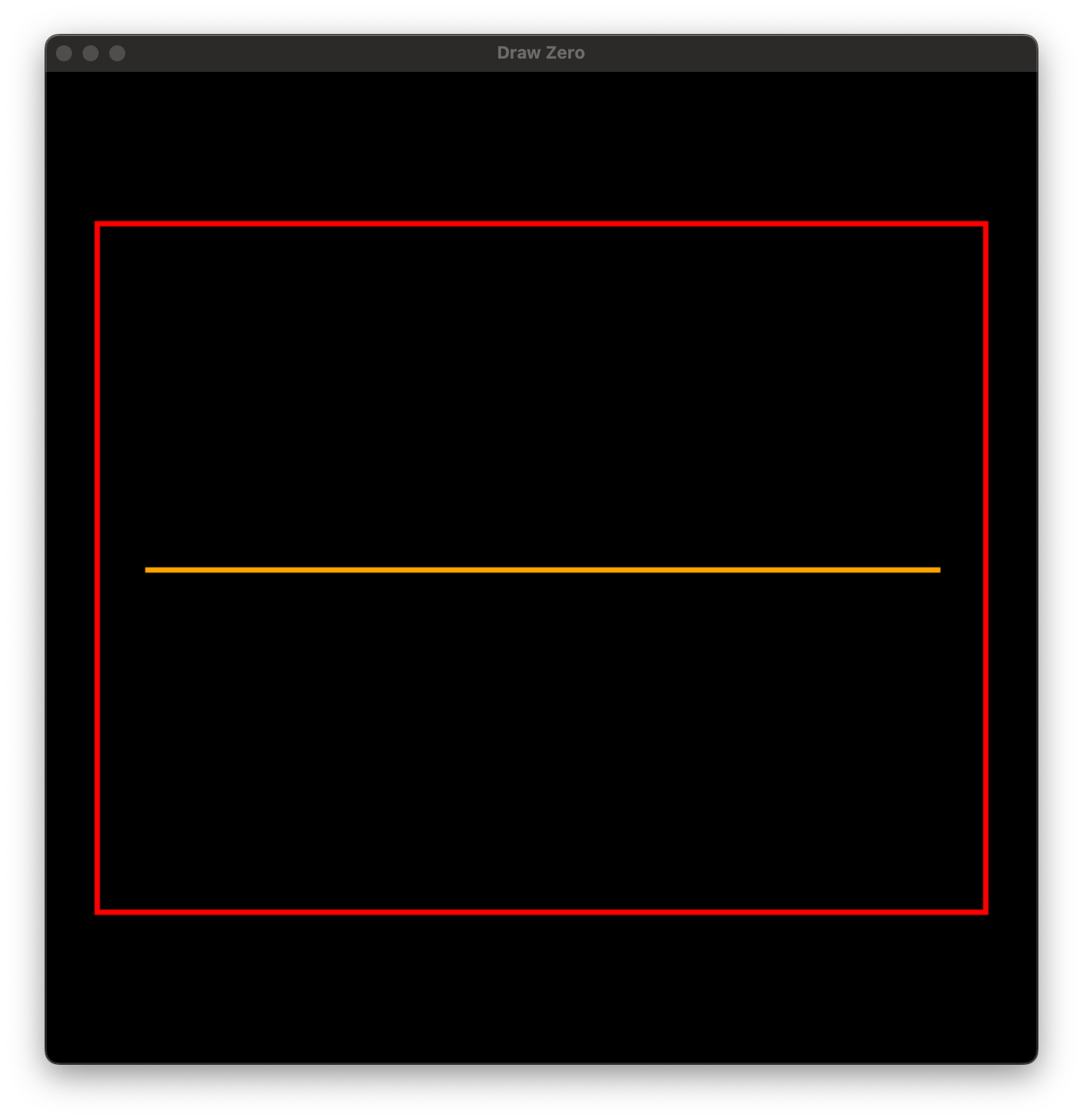
# Just import everything
# Импортируем всё
from drawzero import *

# Red rectangle with upper left corner at (50, 150) and width = 900, height = 700
# Красный прямоугольник с левым верхнем углом в точке(50, 150), шириной 900 и высотой 700
rect('red', (50, 150), 900, 700)

# Straight orange line from (100, 500) to (900, 500)
# Оранжевая прямая линия из точки (100, 500) в точку (900, 500)
line('orange', (100, 500), (900, 500))

# Centered text
# Центрированный текст
text('green', 'Hello world!', (500, 250), fontsize=72)
text('blue', 'Привет, мир!', (500, 750), fontsize=72)
01_grid_and_coordinates.py
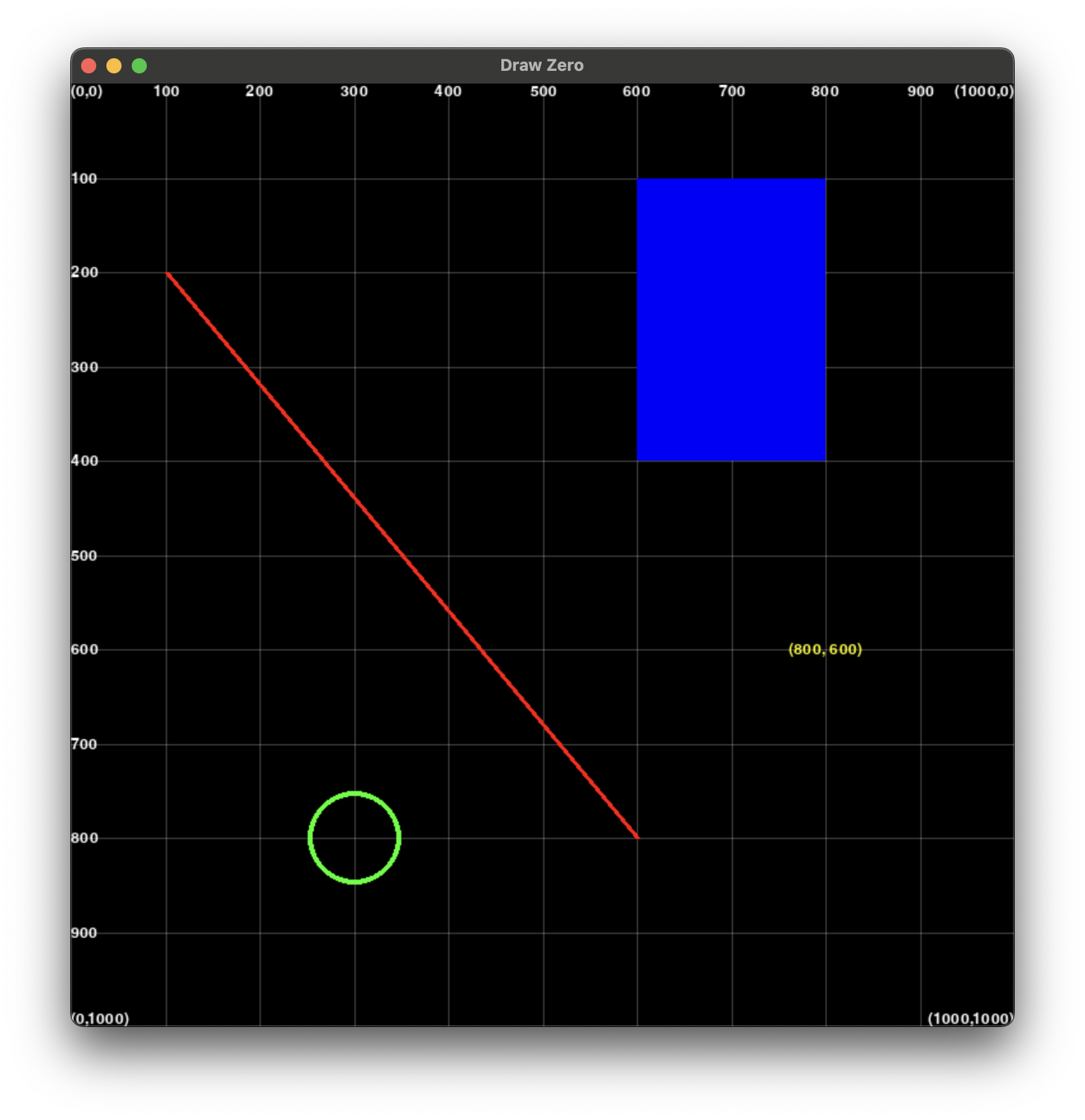
from drawzero import *

# Canvas is always 1000×1000
# Размер холста всегда 1000×1000

# Coordinate grid
# Координатная сетка для упрощения рисования
grid()

# (100, 200) -> (600, 800)
line('red', (100, 200), (600, 800))

# ┌─ at (600, 100), width=200, height=300
filled_rect('blue', (600, 100), 200, 300)

# Center at (300, 800), radius = 50
circle('green', (300, 800), 50)

# Center of text at (800, 600)
text('yellow', '(800, 600)', (800, 600))
Использование циклов и цветов
Используйте циклы и случайные значения, чтобы быстро получать выразительные узоры и научиться передавать цвета в именованном и RGB-форматах.
02_loops_and_rgb_colors.py
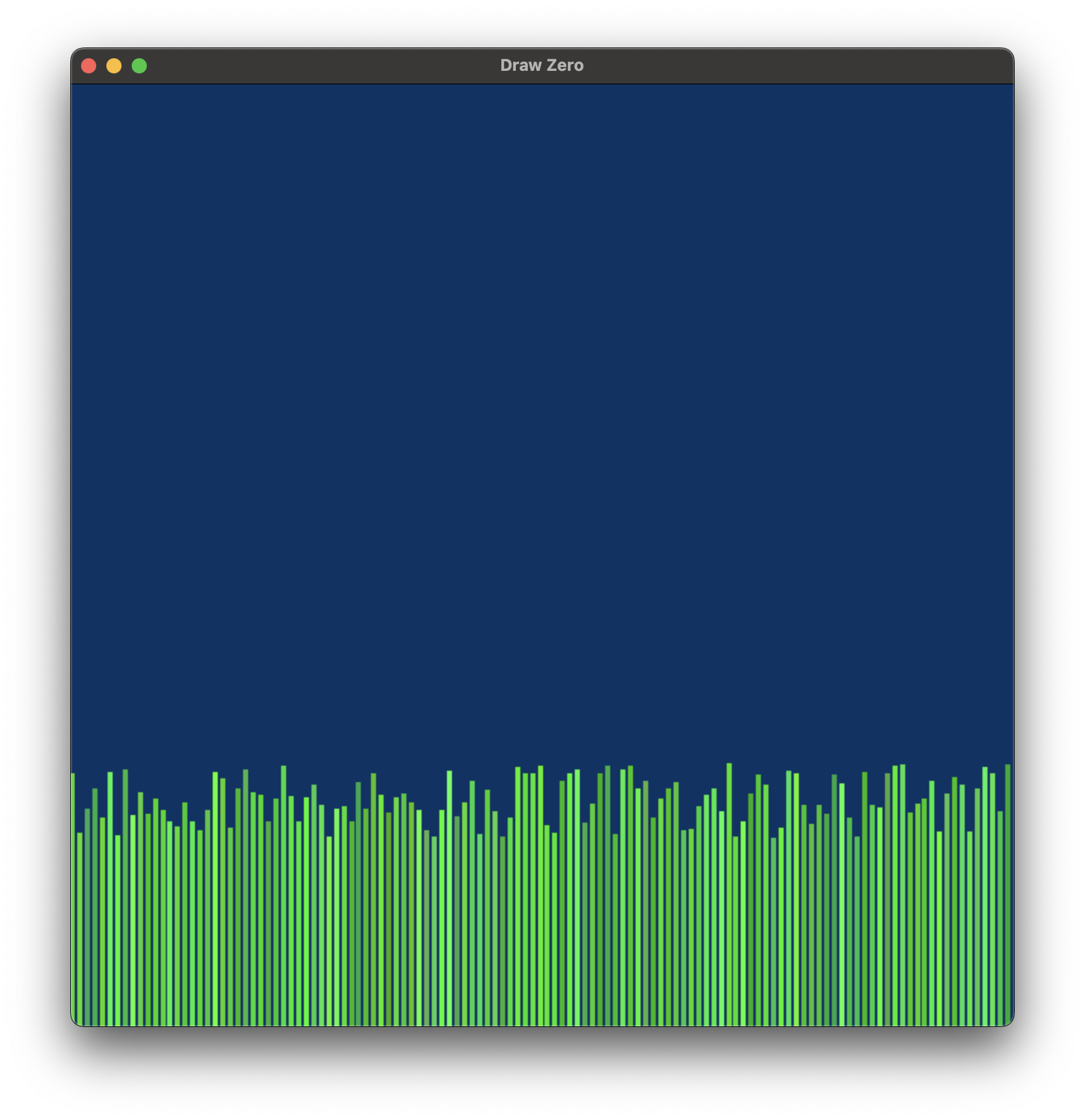
from drawzero import *
from random import randint, seed

# Fill with color #003366 (Dark midnight blue)
# Заливка цветом #003366 (Dark midnight blue)
fill('#003366')

# Draw a vertical line every 8 "pixels"
# Будем рисовать линию через каждые 8 пунктов
for x in range(0, 1000, 8):
    # Color is defined by 3 components: red, greed and blue. Take them at random
    # Каждый цвет состоит из трёх компонент: красной, зелёной и синей. Выбираем их случайно
    red = randint(0, 90)
    green = 255 - randint(0, 90)
    blue = randint(0, 90)
    random_green_color = (red, green, blue)

    # Take line height at random too.
    # Высота тоже случайная
    height = 200 + randint(0, 80)

    # 1000 — is the bottom of the canvas
    # 1000 самый низ экрана
    line(random_green_color, (x, 1000 - height), (x, 1000))
03_simple_objects.py
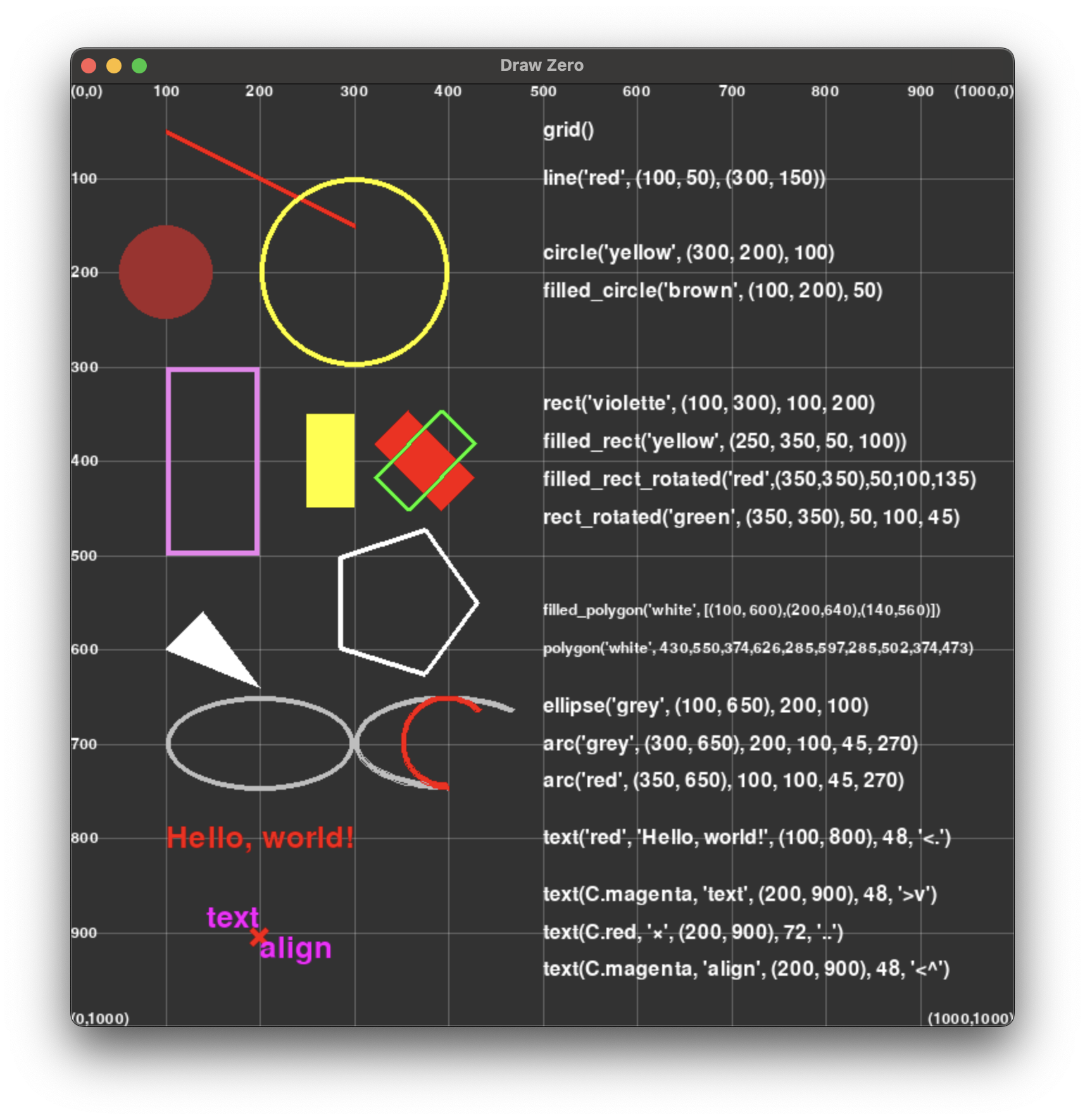
from drawzero import *

# All shapes

# Fill with color rgb=(50, 50, 50)
fill((50, 50, 50))

# Grid
grid()
text('white', "grid()", (500, 50), 32, '<.')

# Straight line
line('red', (100, 50), (300, 150))
text('white', "line('red', (100, 50), (300, 150))", (500, 100), 32, '<.')

# Circles
circle('yellow', (300, 200), 100)
filled_circle('brown', (100, 200), 50)
text('white', "circle('yellow', (300, 200), 100)", (500, 200 - 20), 32, '<.')
text('white', "filled_circle('brown', (100, 200), 50)", (500, 200 + 20), 32, '<.')

# Rectangles
rect('violet', (100, 300), 100, 200)
filled_rect('yellow', (250, 350, 50, 100))  # tuple[x,y,w,h] is also OK
filled_rect_rotated('red', (350, 350), 50, 100, 135)
rect_rotated('green', (350, 350), 50, 100, 45)
text('white', "rect('violette', (100, 300), 100, 200)", (500, 400 - 40 - 20), 32, '<.')
text('white', "filled_rect('yellow', (250, 350, 50, 100))", (500, 400 - 20), 32, '<.')
text('white', "filled_rect_rotated('red',(350,350),50,100,135)", (500, 400 + 20), 32, '<.')
text('white', "rect_rotated('green', (350, 350), 50, 100, 45)", (500, 400 + 40 + 20), 32, '<.')

# Polygons
filled_polygon('white', [(100, 600), (200, 640), (140, 560)])  # list oftuples
polygon('white', 430, 550, 374, 626, 285, 597, 285, 502, 374, 473)  # or just flattened
text('white', "filled_polygon('white', [(100, 600),(200,640),(140,560)])", (500, 600 - 40), 24, '<.')
text('white', "polygon('white', 430,550,374,626,285,597,285,502,374,473)", (500, 600), 24, '<.')

# Ellipsis and arcs
ellipse('grey', (100, 650), 200, 100)
arc('grey', (300, 650), 200, 100, start_angle=45, stop_angle=270)
arc('red', (350, 650), 100, 100, start_angle=45, stop_angle=270)
text('white', "ellipse('grey', (100, 650), 200, 100)", (500, 700 - 40), 32, '<.')
text('white', "arc('grey', (300, 650), 200, 100, 45, 270)", (500, 700), 32, '<.')
text('white', "arc('red', (350, 650), 100, 100, 45, 270)", (500, 700 + 40), 32, '<.')

# Text
text('red', 'Hello, world!', (100, 800), 48, '<.')
text('white', "text('red', 'Hello, world!', (100, 800), 48, '<.')", (500, 800), 32, '<.')

text('magenta', 'text', (200, 900), 48, '>v')
text('red', '×', (200, 900), 72, '..')
text('magenta', 'align', (200, 900), 48, '<^')
text('white', "text(C.magenta, 'text', (200, 900), 48, '>v')", (500, 860), 32, '<.')
text('white', "text(C.red, '×', (200, 900), 72, '..')", (500, 900), 32, '<.')
text('white', "text(C.magenta, 'align', (200, 900), 48, '<^')", (500, 940), 32, '<.')
04_loops_sin_plot.py
from drawzero import *
from math import sin

line('blue', 0, 500, 1000, 500)
line('blue', 500, 0, 500, 1000)

STEP = 4
SCALE = 100
for x1 in range(0, 1000, STEP):
    y1 = 500 + SCALE * sin(x1 / SCALE)
    x2 = x1 + STEP
    y2 = 500 + SCALE * sin(x2 / SCALE)
    line('red', (x1, y1), (x2, y2))
Точки и черепашья графика
Класс Pt из публичного API работает и как вектор, и как "черепаха". Эти примеры показывают
арифметику точек и построение фигур через повороты и смещения.
05_points.py
from drawzero import *

# just coordinates
A = Pt(100, 100)
B = Pt(300, 150)
line(C.red, A, B)

# A point which acts as 2-d vector and as a Turtle
# Pt(x=0.0, y=0.0, *, heading=0.0)
#
# Provides (for a, b — points, k number):
#   * arithmetic
#     a+b — vector addition
#     a-b — vector subtraction
#     k*a and a*k — multiplication with scalar
#     abs  — absolute value of a
#     +a, -a

# arithmetic
A = Pt(100, 200)
dx = Pt(50, 5)
for i in range(10):
    filled_circle(C.blue, A + dx * i, radius=10)

#   * turtle-style movement
#     forward — Move the point forward by the specified distance.
#     backward — Move the point backward by distance.
#     right — Turn point right by angle degrees.
#     left — Turn point left by angle degrees.
#     goto — Move point to an absolute position.
#     rotate_around — Rotate around given point by angle degrees.
#     move_towards — Move towards the given point by the specified distance.
#     reset, home — Move point to the origin - coordinates (0,0), set heading=0
#     setx — Set the point's first coordinate to x
#     sety — Set the point's second coordinate to y
#     setheading — Set the point's heading

A = Pt(100, 300)
B = Pt(1000, 400)
for i in range(10):
    filled_circle(C.green2, A, radius=10)
    A.move_towards(50, B)

A = Pt(100, 400)
for i in range(10):
    filled_circle(C.magenta, A, radius=10)
    A.left(10).forward(30)

#   * information
#     position — Return the point's current location (x,y), as a tuple.
#     x, xcor — Return the point's x coordinate.
#     y, ycor — Return the point's y coordinate
#     heading — Return the point's heading
#     distance — Return the distance between points
#     towards — Return the angle towards point
#   * deep copy
#     copy — a clone of point
06_turtle_style.py
from drawzero import *

colors = [C.darkslategrey, C.dimgrey, C.slateblue, C.darkblue, C.yellowgreen, C.maroon,
          C.violetred, C.darkslategray, C.honeydew, C.mediumpurple, C.lightsalmon]

# Drawing regular polygons for n from 3 to 10
# Рисуем правильные треугольник (n=3), четырёхугольник и т.д. до десятиугольник
for n in range(3, 11):
    cur = Pt(600, 800)
    # Drawing n lines for regular polygon
    # Каждую сторону рисуем отдельно
    for i in range(n):
        prev = cur.copy()
        # How to get next point? We clone the old one, rotate left and move forward a bit
        # Чтобы получить новую вершину, мы клонируем старую, поворачиваемся и двигаемся вперёд
        cur.left(360 / n)
        cur.forward(200)
        line(colors[n], prev, cur)
Анимация
Здесь начинается анимация: цикл while True, tick(), clear() и дополнительные эффекты,
которые встречаются в примерах 07–10.
07_animation_circles.py
from drawzero import *

# Animations are straightforward
for i in range(0, 60 * 5, 3):
    # Take color at "random"
    # Выбираем цвет псевдослучайно
    color = (i % 255, (19 * i) % 255, (91 * i) % 255)
    x = 100 + 2 * i
    y = 100 + i // 5
    r = 20 + 4 * (i % 5)
    circle(color, (x, y), r)
    # Sleep for 1/30 second
    # Самое главное для анимации — ждём 1/30 секунды
    tick()
08_animation_traffic_light.py
from drawzero import *

# С — is an object with colors as attributes.
# С — специальный объект, у которого есть атрибуты — предопределённые цвета
# https://www.pygame.org/docs/ref/color_list.html
red_on = C.red
red_off = C.red4
yellow_on = C.yellow
yellow_off = C.yellow4
green_on = C.green
green_off = C.green4

fill(C.white)


def traf_light(red, yellow, green):
    """Function to draw signals with given colors
    """
    filled_rect(C.black, (400, 300, 200, 480))
    filled_circle(green, (500, 680), 60)
    filled_circle(yellow, (500, 540), 60)
    filled_circle(red, (500, 400), 60)


for i in range(3):
    traf_light(red_on, yellow_off, green_off)
    sleep(1)
    traf_light(red_off, yellow_on, green_off)
    sleep(1)
    traf_light(red_off, yellow_off, green_on)
    sleep(1)
    traf_light(red_off, yellow_on, green_off)
    sleep(1)
09_animation_rectangles.py
"""
In this example we use Pt class for turtle-like coordinate manipulations.
Используем класс Pt, позволяющий менять координаты в "черепашьем" стиле
"""
from drawzero import *

screen_center = Pt(500, 500)

small_rect_size = Pt(50, 30)
small_rect_center = screen_center + Pt(300, 0)

big_rect_size = Pt(100, 80)
big_rect_center = screen_center.copy()
for i in range(720):
    # First we make all calculations for the next frame

    # Rotate the big rectangle left by 3 degrees
    big_rect_center.left(3)
    # Line from the center outside the canvas using big rect heading
    laser = big_rect_center.copy().forward(700)
    # Rotate the small rect around the screen center for 1 degree
    small_rect_center.rotate_around(1, screen_center)
    # Rotate the small rect by 5 degrees
    small_rect_center.right(5)

    # Sleep 1/30 second
    tick()
    # No we clear the canvas and draw the next frame
    clear()

    # We need to subtract size/2 to get left upper rect position
    filled_rect_rotated(C.green, big_rect_center - big_rect_size / 2, big_rect_size, angle=big_rect_center.heading)
    # Sometimes we draw laser
    if i % 37 <= 4:
        line(C.orange, screen_center, laser, line_width=10, alpha=140)
    # Transparent small rectangle orbit
    circle(C.yellow, screen_center, 300, line_width=1, alpha=50)
    filled_rect_rotated(C.red, small_rect_center - small_rect_size / 2, small_rect_size, angle=small_rect_center.heading)
    circle(C.violet, screen_center, 10)
10_animation_planets.py
from drawzero import *
from math import sin, cos, pi

earth_orbit = 400
earth_radius = 30
earth_rot_step = 2 * pi / 360
moon_orbit = 100
moon_radius = 10
moon_rot_step = 2 * pi / 60

for i in range(360 * 2):
    # First we make all calculations for the next frame
    e_x = 500 + earth_orbit * cos(earth_rot_step * i)
    e_y = 500 + earth_orbit * sin(earth_rot_step * i)
    m_x = e_x + moon_orbit * cos(moon_rot_step * i)
    m_y = e_y + moon_orbit * sin(moon_rot_step * i)

    # Sleep 1/30 second
    tick()
    # No we clear the canvas and draw the next frame
    clear()

    filled_circle(C.red, (500, 500), 100)
    filled_circle(C.blue, (e_x, e_y), earth_radius)
    filled_circle(C.yellow, (m_x, m_y), moon_radius)
Продвинутое рисование
Эти скрипты раскрывают дополнительные функции библиотеки: прозрачность, загрузку изображений и градиенты, на которых основаны многие визуальные эффекты из исходников.
11_transparency_and_line_width.py
from drawzero import *

filled_circle('red', (100, 100), 20)
# Set line_width to change line_width
circle('red', (100, 100), 50, line_width=10)
# Set alpha from 0 to 255 to use transparency
filled_circle('blue', (100, 110), 22, alpha=100)
# Or user RGBA for color (RGBA stands for red green blue alpha)
circle((0, 255, 0, 50), (100, 110), 50, line_width=10)

filled_rect(C.aquamarine, (200, 100), 100, 40)
filled_rect(C.darkmagenta, (210, 110), 100, 40, alpha=80)
rect(C.darkgoldenrod, (180, 90), 200, 80, line_width=10)
rect(C.hotpink, (190, 90), 200, 90, alpha=180, line_width=10)

line('red', 600, 400, 600, 990)

polygon('yellow', [(20, 300), (100, 340), (40, 260)], line_width=20)
polygon((0, 0, 255, 200), [(20, 300), (100, 340), (40, 260)], line_width=15)
polygon('red', [(20, 300), (100, 340), (40, 260)])

filled_polygon('burlywood', 200, 600, 130, 504, 20, 542, 20, 658, 130, 696)
filled_polygon(C.hotpink, 200, 700, 130, 604, 20, 642, 20, 758, 130, 796, alpha=100)

line(C.green, (700, 100), (800, 200))
line(C.green, (710, 100), (810, 200), line_width=5)
line(C.red, (820, 100), (720, 200), line_width=10, alpha=50)
line(C.blue, (830, 100), (730, 200), line_width=10, alpha=128)

# Alpha channel is straightforward
rect('yellow', (500, 100), 100, 700, line_width=30, alpha=255)  # via alpha
rect('#00FFFF', (520, 120), 100, 700, line_width=30, alpha=100)  # via alpha
filled_rect((0, 255, 0, 50), (100, 500), 700, 100)  # via rgba

ellipse('grey', (100, 850), 200, 100, alpha=100)
filled_ellipse('red', (100 + 50, 850 + 25), 100, 50, alpha=100)
arc('blue', (200, 850), 200, 100, start_angle=45, stop_angle=270, alpha=100, line_width=10)

fill(C.magenta, alpha=30)
12_images.py
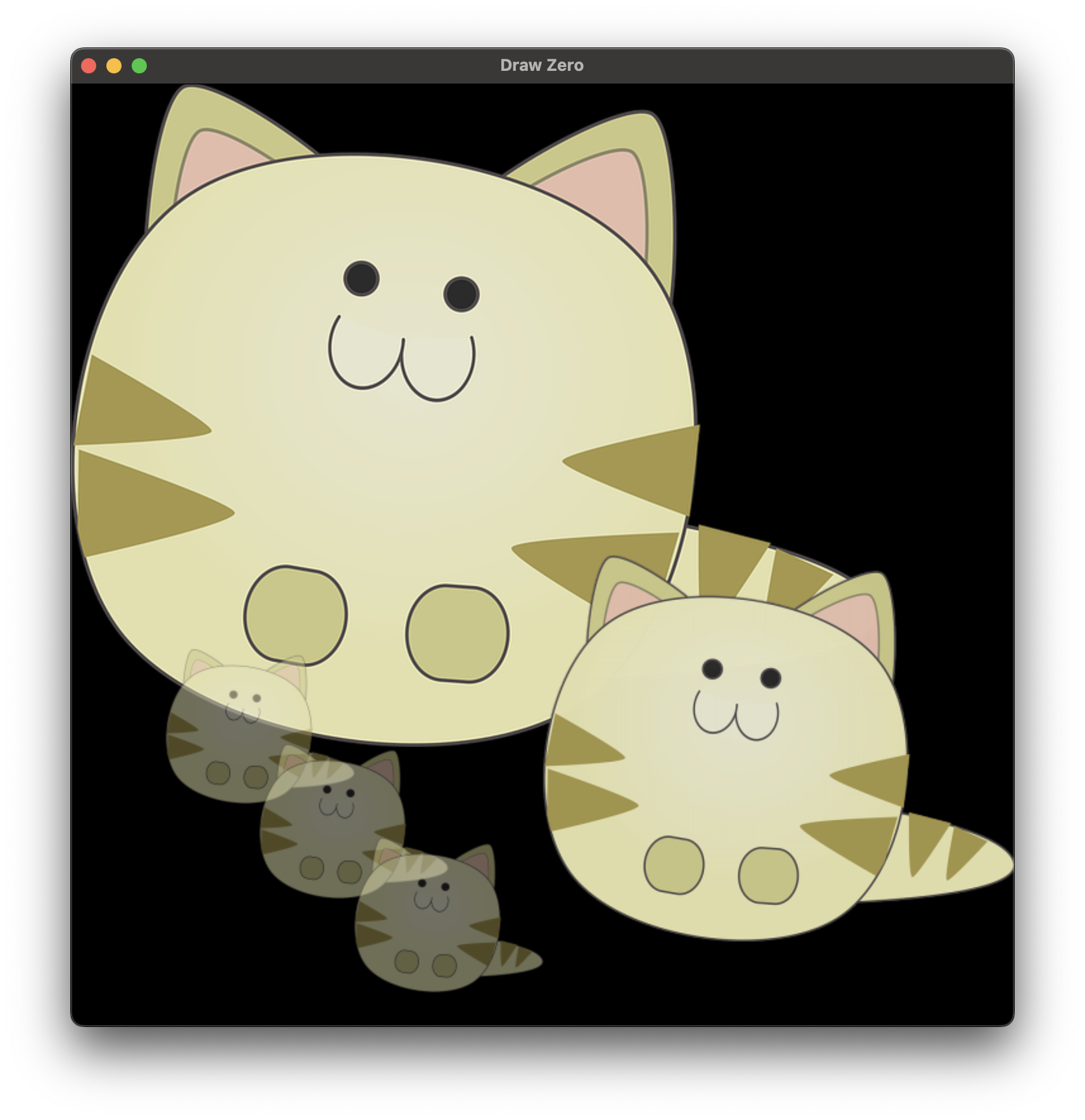
from pathlib import Path
from drawzero import *

this_file_dir = Path(__file__).parent.absolute()

image(this_file_dir / 'cat.png', (0, 0))
image(this_file_dir / 'cat.png', (500, 500), width=500)

image(this_file_dir / 'cat.png', (100, 600), width=200, alpha=128)
image(this_file_dir / 'cat.png', (200, 700), width=200, alpha=128)
image(this_file_dir / 'cat.png', (300, 800), width=200, alpha=128)
13_gradients.py
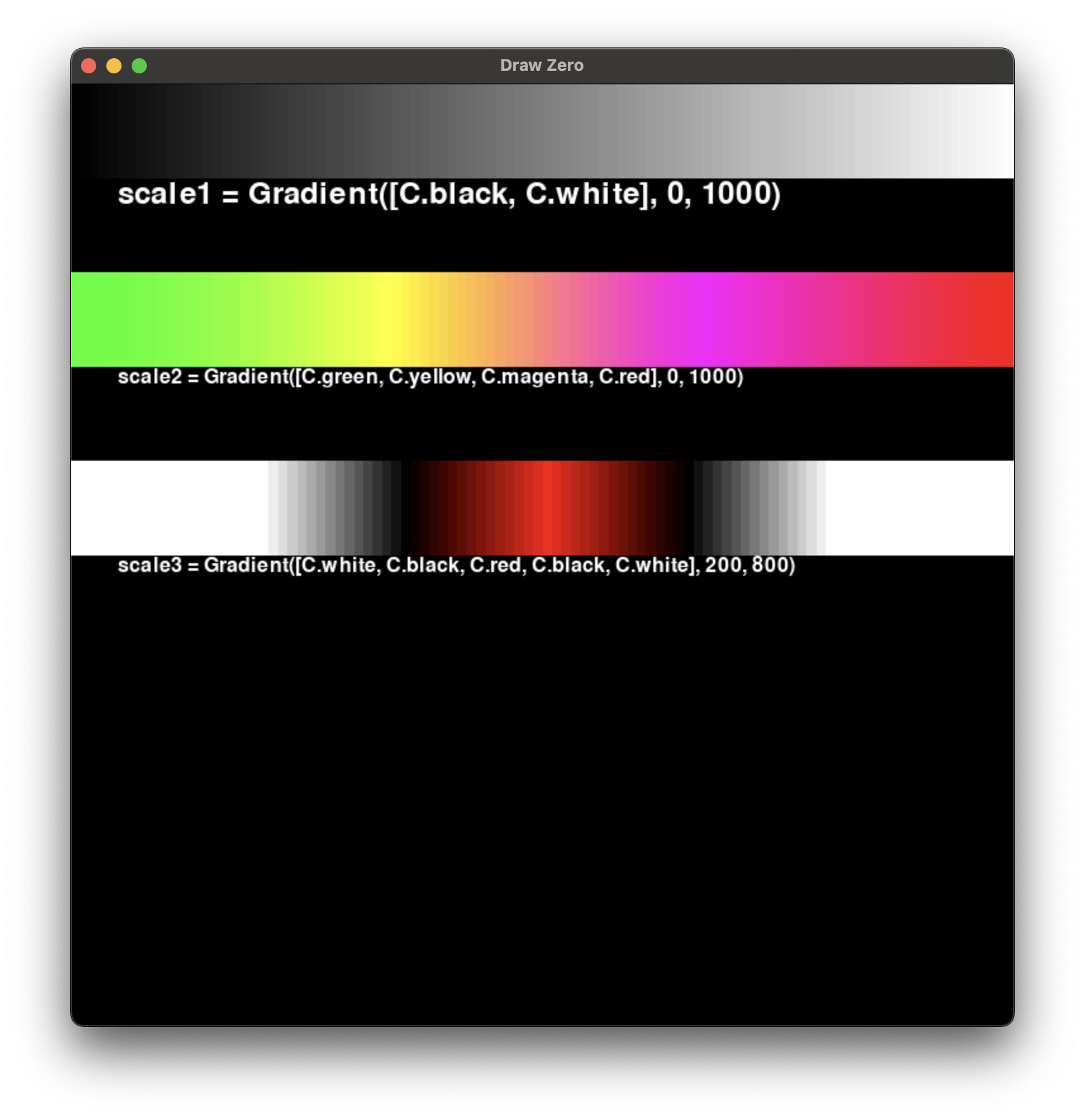
from drawzero import *


scale1 = Gradient([C.black, C.white], 0, 1000)
for x in range(0, 1000, 10):
    filled_rect(scale1(x), (x, 0), 10, 100)
text(C.white, 'scale1 = Gradient([C.black, C.white], 0, 1000)', (50, 100), 48, '<^')

scale2 = Gradient([C.green, C.yellow, C.magenta, C.red], 0, 1000)
for x in range(0, 1000, 10):
    filled_rect(scale2(x), (x, 200), 10, 100)
text(C.white, 'scale2 = Gradient([C.green, C.yellow, C.magenta, C.red], 0, 1000)', (50, 300), 32, '<^')

scale3 = Gradient([C.white, C.black, C.red, C.black, C.white], 200, 800)
for x in range(0, 1000, 10):
    filled_rect(scale3(x), (x, 400), 10, 100)
text(C.white, 'scale3 = Gradient([C.white, C.black, C.red, C.black, C.white], 200, 800)', (50, 500), 32, '<^')
Интерактивные примеры
Добавьте управление с клавиатуры и мыши, чтобы рисунки реагировали на пользователя в реальном времени.
14_animation_close_vertex.py
from drawzero import *
from random import randint, uniform
from itertools import combinations

NUM_POINTS = 100
MIN_DIST = 150
MAX_SPEED = 4
"""
Here we use Pt class for coordinates. It looks like a tuple with .x and .y methods (and many other).
Здесь мы используем класс Pt для работы с координатами. Почти кортеж, только изменяемый с атрибутами .x и .y
"""
points = [
    (Pt(randint(0, 1000), randint(0, 1000)), Pt(uniform(-MAX_SPEED, MAX_SPEED), uniform(-MAX_SPEED, MAX_SPEED)))
    for __ in range(NUM_POINTS)
]
scale = Gradient(['#5cc3e6', C.black], 0, MIN_DIST)

for i in range(30 * 30):
    # First we make all calculations for the next frame
    for pt, v in points:
        pt.x = (pt.x + v.x) % 1000
        pt.y = (pt.y + v.y) % 1000

    # Sleep 1/30 second
    tick()
    # No we clear the canvas and draw the next frame
    clear()

    for (pt1, v1), (pt2, v2) in combinations(points, r=2):
        dist = pt1.distance(pt2)
        if dist < MIN_DIST:
            color = scale(dist)
            line(color, pt1, pt2, line_width=1)
    for pt, v in points:
        filled_circle('blue', pt, 5)
    fps()
15_animation_firework.py
from drawzero import *
import random
import math
from typing import List

G = -2.0


class Particle:
    vx: float
    vy: float
    cx: float
    cy: float
    color: tuple
    alive: bool
    max_age: int
    age: int = 0
    GLOW = 20
    START_SPEED = 20
    MAX_SIZE = 4
    SCALE = Gradient([C.yellow, C.red], 0, GLOW)

    def __init__(p, x, y):
        random_angle = random.uniform(0, 2 * math.pi)
        random_speed = random.uniform(p.START_SPEED * 0.5, p.START_SPEED * 1.5)
        p.vx = math.cos(random_angle) * random_speed
        p.vy = math.sin(random_angle) * random_speed
        p.color = (random.randint(0, 255), random.randint(0, 255), random.randint(0, 255))
        p.cx, p.cy = x, y
        p.max_age = random.randint(5, p.GLOW)
        p.alive = True

    def draw(p):
        if p.age < p.GLOW:
            color = p.SCALE(p.age)
            filled_circle(color, (p.cx, p.cy), p.MAX_SIZE * (p.GLOW - p.age) / p.GLOW)

    def update(p):
        p.cx += p.vx
        p.cy += p.vy
        p.vy -= G
        p.age += 1
        if p.cy > 1000 or p.age > p.max_age:
            p.alive = False


class Firework:
    STICK_WIDTH = 5
    HANDLE = 200
    NEW_PARTICLES = 25
    HANDLE_COLOR = (64, 64, 64)
    POWDER_COLOR = (255, 255, 255)
    BURNT_COLOR = (102, 102, 102)

    def __init__(self, x, y, height, sleep=2):
        self.ticks = 0
        self.x = x
        self.y = y
        self.height = height
        self.particles: List[Particle] = []
        self.cur_top = 0
        self.sleep = sleep

    def update(self):
        self.ticks += 1
        if self.ticks < 30 * self.sleep or self.cur_top > self.height:
            return
        self.cur_top += 1
        self.update_particles()
        self.remove_particles()
        self.create_new_particles()

    def draw(self):
        self.draw_stick()
        for p in self.particles:
            p.draw()

    def remove_particles(self):
        last_good = -1
        for cur in range(len(self.particles)):
            p = self.particles[cur]
            if p.alive:
                last_good += 1
                self.particles[last_good] = p
        del self.particles[last_good + 1:]

    def update_particles(self):
        for p in self.particles:
            p.update()

    def create_new_particles(self):
        if self.cur_top < self.height - self.HANDLE:
            for __ in range(self.NEW_PARTICLES):
                self.particles.append(Particle(x=self.x, y=self.y + self.cur_top))

    def draw_stick(self):
        w = self.STICK_WIDTH
        real_top = min(self.cur_top, self.height - self.HANDLE)
        filled_rect(self.HANDLE_COLOR, (self.x - w / 2, self.y), w, self.height)
        filled_rect(self.BURNT_COLOR, (self.x - w / 2 - 2, self.y), w + 4, real_top)
        filled_rect(self.POWDER_COLOR, (self.x - w / 2 - 3, self.y + real_top), w + 6, self.height - self.HANDLE - real_top)

    def is_burnt(self):
        return self.cur_top > 0 and len(self.particles) == 0


firework1 = Firework(x=333, y=200, height=600, sleep=1)
firework2 = Firework(x=666, y=400, height=500, sleep=2)

while not firework1.is_burnt() or not firework2.is_burnt():
    firework1.update()
    firework2.update()
    tick()
    clear()
    firework1.draw()
    firework2.draw()
    fps()

sleep(1)
quit()
16_keyboard_and_mouse.py
from drawzero import *

x = y = 500
color = C.red
presses = 0
while True:
    speed = 12 if keyboard.pressed('shift') else 4
    dx = keyboard.axis(('left', 'a'), ('right', 'd'))
    dy = keyboard.axis(('up', 'w'), ('down', 's'))
    x += speed * dx
    y += speed * dy
    if keyboard.just_pressed('space'):
        presses += 1
        color = C.blue if color == C.red else C.red
    for event in events():
        if event.type == E.MOUSE_DOWN and event.button == M.LEFT:
            x, y = event.pos
    clear()
    text(C.white, 'CONTROLS / STATE', (500, 70), 48)
    text(C.white, 'Arrows or WASD move; Shift speeds up', (500, 150), 32)
    text(C.white, 'Space changes color once; click places the square', (500, 205), 30)
    text(C.cyan, f'Axis: ({dx}, {dy})   Shift: {keyboard.pressed("shift")}', (500, 300), 36)
    text(C.yellow, f'Space presses: {presses}', (500, 360), 36)
    filled_rect(color, (x, y), 35, 35)
    filled_circle(C.yellow, mouse.pos, 6)
    tick(fps=60)
17_mouse_tube.py
from drawzero import *

circles = []
tick()
scale = Gradient([C.gray10, C.blue, C.orange], 100, 500)
while True:
    x, y = mouse.pos
    circles.append([x, y, 100])
    clear()
    for i in range(len(circles) - 1, -1, -1):
        x, y, r = circles[i]
        if r > 1000:
            circles.pop(i)
        else:
            circle(scale(r), (x, y), r, line_width=3)
            circles[i][2] += 10
    fps()
    tick()
Игры
И, наконец, несколько мини-игр, собранных из примитивов, анимации и обработки ввода.
18_game_stars.py
from drawzero import *
from random import randint
from dataclasses import dataclass

from time import perf_counter
NUM_STARS = 300


@dataclass
class Star:
    x: float
    y: float
    z: float
    r: int
    color: tuple


def gen_star():
    '''Создать звезду'''
    x = randint(-1000000 // 2, 1000000 // 2)
    y = randint(1, 1000)
    z = randint(-1000000 // 2, 1000000 // 2)
    r = randint(10, 3000)
    color = (randint(0, 255), randint(0, 255), randint(0, 255))
    return Star(x, y, z, r, color)


def create_stars():
    '''Создать массив звёзд'''
    stars = []
    for i in range(NUM_STARS):
        stars.append(gen_star())
    return stars


def move_stars(stars, speed):
    '''Сдвинуть все звёзды
    Если звезда перестала попадать на экран, то заменяем её на новую'''
    Vx, Vy, Vz = speed
    for i, star in enumerate(stars):
        star.x += Vx
        star.y += Vy
        star.z += Vz
        if (
                not (1 < star.y < 1000)
                or not (-500 < star.x / star.y < 500)
                or not (-500 < star.x / star.y < 500)
        ):
            # Вообще это — так себе решение. Но частично работает
            stars[i] = gen_star()


def draw_stars(stars):
    '''Отрисовать все звёзды'''
    # Сортируем звёзды, чтобы те, которые ближе к экрану, отрисовывались позже
    stars.sort(key=lambda star: -star.y)
    for star in stars:
        y = star.y
        screen_x = 500 + star.x / y
        screen_y = 500 + star.z / y
        screen_r = star.r / y
        filled_circle(star.color, (screen_x, screen_y), screen_r*2)
    text('white', 'Press WASD or QE to move', (500, 5), 48, '.^')


def process_keys(speed):
    '''Обрабатываем нажатия клавиш
    Используем WASD для вверх/вниз/влево/вправо и QE для вперёд/назад'''
    if keyboard.pressed(K.UP) or keyboard.pressed(K.w):
        speed[2] += 100
    if keyboard.pressed(K.DOWN) or keyboard.pressed(K.s):
        speed[2] -= 100
    if keyboard.pressed(K.LEFT) or keyboard.pressed(K.a):
        speed[0] += 100
    if keyboard.pressed(K.RIGHT) or keyboard.pressed(K.d):
        speed[0] -= 100
    if keyboard.pressed(K.q):
        speed[1] -= 1
    if keyboard.pressed(K.e):
        speed[1] += 1


# Здесь ставим размер экрана
stars = create_stars()
# Текущая скорость, стартуем с 0
speed = [0, 0, 0]
while True:
    # Заливаем всё чёрным
    fill((0, 0, 0))
    # Обрабатываем нажатия клавиш
    process_keys(speed)
    # Двигаем звёзды
    move_stars(stars, speed)
    # Рисуем звёзды
    draw_stars(stars)
    # Ждём 1/30 секунды
    tick()
19_game_colors.py
from drawzero import *
import random
from time import time

COLORS = [('yellow', 'yellow'), ('green', 'green'), ('cyan', '#42aaff'), ('blue', '#0000ff'), ('purple', 'purple'),
          ('red', 'red'), ('orange', 'orange'), ('brown', 'brown'), ('gray', 'gray'), ('white', 'white'), ]


def gen_new():
    cur_word, color = random.choice(COLORS)
    corr = True
    if random.random() < 0.5:
        corr = False
        new_color = color
        while new_color == color:
            __, color = random.choice(COLORS)
    return cur_word, color, corr


score = 0
cur_timelimit = 4
cur_word, color, corr = gen_new()
cur_status = None
round_start = last_status_ts = time()
while True:
    cur_ts = time()
    time_left = round_start + cur_timelimit - cur_ts
    if time_left < 0:
        score -= 1
        cur_timelimit *= 1.02
        cur_word, color, corr = gen_new()
        round_start = last_status_ts = cur_ts
        cur_status = None
        time_left = cur_timelimit
    clear()
    text('white', f'Scores: {score}', (500, 50), 48)
    text('white', f'Double-click the left mouse button,', (500, 100), 32)
    text('white', f'if the word and color match, otherwise right-click', (500, 142), 32)
    text('white', f'{time_left:0.2f}s...', (500, 600), 48)
    text(color, cur_word, (500, 500), 120)
    if cur_status == 1:
        text('green', 'Match?', (500, 700), 48)
    elif cur_status == 3:
        text('red', 'Mismatch?', (500, 800), 48)
    # Ignore clicks for half a second after color change
    for ev in mouse.events:
        if ev.type != E.MOUSE_DOWN:
            continue
        if cur_ts - last_status_ts > 0.3:
            if ev.button == cur_status:
                # User confirmed
                if (corr and cur_status == 1) or (not corr and cur_status == 3):
                    score += 1
                    cur_timelimit *= 0.95
                else:
                    score -= 1
                    cur_timelimit *= 1.02
                cur_word, color, corr = gen_new()
                round_start = last_status_ts = cur_ts
                cur_status = None
            elif ev.button in (1, 3):
                cur_status = ev.button
                last_status_ts = cur_ts
    tick()
20_game_racing.py
from drawzero import *

cars_y = [540, 500, 460]
cars_x = [100, 100, 100]
ups = [K.w, K.i, K.UP]
downs = [K.s, K.k, K.DOWN]
lefts = [K.a, K.j, K.LEFT]
rights = [K.d, K.l, K.RIGHT]
colors = ['green', 'blue', 'yellow']
scores = [1000, 1000, 1000]

road = [500] * 30 + list(range(500, 700, 3)) + list(range(700, 900, 6)) + list(range(900, 100, -4)) + list(
    range(100, 500, 8))
road.extend(road)
road.extend(road)
WIDTH2 = 80
road_pos = 0
for i in 3, 2, 1:
    clear()
    text('green', 'READY? ' + str(i), (300, 400), 128)
    sleep(1)

while True:
    for i in range(len(cars_y)):
        if keyboard.pressed(ups[i]):
            cars_y[i] -= 5
        if keyboard.pressed(downs[i]):
            cars_y[i] += 5
        if keyboard.pressed(lefts[i]):
            cars_x[i] -= 5
        if keyboard.pressed(rights[i]):
            cars_x[i] += 5
    clear()
    for i in range(len(cars_y)):
        filled_rect(colors[i], (cars_x[i], cars_y[i] - 20), 80, 40, alpha=70)
    for i in range(100):
        line('red', i * 10, road[i + road_pos] - WIDTH2, i * 10 + 10, road[i + 1 + road_pos] - WIDTH2)
        line('red', i * 10, road[i + road_pos] + WIDTH2, i * 10 + 10, road[i + 1 + road_pos] + WIDTH2)
    for i in range(len(cars_y)):
        if cars_y[i] - 20 < road[cars_x[i] // 10 + road_pos] - WIDTH2:
            text(colors[i], 'Boom!', (300 + 200 * i, 10), 72)
            cars_y[i] = road[cars_x[i] // 10 + road_pos] - WIDTH2 + 20
            scores[i] -= 1
        elif cars_y[i] + 20 > road[cars_x[i] // 10 + road_pos] + WIDTH2:
            text(colors[i], 'Boom!', (300 + 200 * i, 10), 72)
            cars_y[i] = road[cars_x[i] // 10 + road_pos] + WIDTH2 - 20
            scores[i] -= 1
        text(colors[i], str(scores[i]), (300 + 200 * i, 100), 72)

    tick()
    road_pos += 1
    if road_pos > 1000:
        i = scores.index(max(scores))
        text('white', f'{colors[i]} is winner!', (150, 900), 128)
        tick()
        break
21_precise_drawing.py
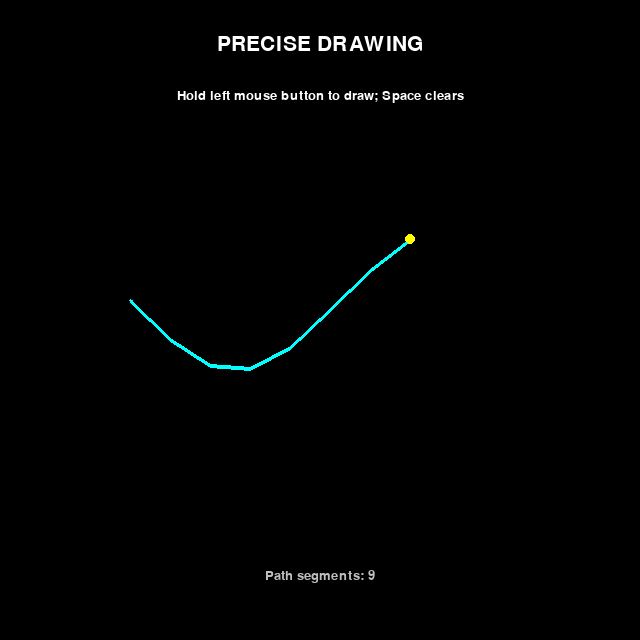
from drawzero import *

segments = []
previous = None
while True:
    for event in events():
        if event.type == E.FOCUS_LOST:
            previous = None
        elif event.type == E.MOUSE_DOWN and event.button == M.LEFT:
            previous = event.pos
        elif event.type == E.MOUSE_MOVE:
            if previous is not None and M.LEFT in event.buttons:
                segments.append((previous, event.pos))
                previous = event.pos
        elif event.type == E.MOUSE_UP and event.button == M.LEFT:
            if previous is not None and not event.source.cancelled:
                segments.append((previous, event.pos))
            previous = None
    if keyboard.just_pressed('space'):
        segments.clear()
    clear()
    text(C.white, 'PRECISE DRAWING', (500, 70), 48)
    text(C.white, 'Hold left mouse button to draw; Space clears', (500, 150), 32)
    for start, end in segments:
        line(C.cyan, start, end, line_width=6)
    filled_circle(C.yellow, mouse.pos, 8)
    text(C.gray, f'Path segments: {len(segments)}', (500, 900), 32)
    tick(fps=60)
22_text_and_scroll.py
from drawzero import *

value = ''
scroll_x = scroll_y = 0
composition = ''
while True:
    for event in events():
        if event.type == E.TEXT_INPUT:
            value += event.text
            composition = ''
        elif event.type == E.TEXT_EDITING:
            composition = event.text
        elif event.type == E.KEY_DOWN and event.key == K.BACKSPACE:
            value = value[:-1]
        elif event.type == E.FOCUS_LOST:
            composition = ''
    dx, dy = mouse.wheel
    scroll_x += dx
    scroll_y += dy
    clear()
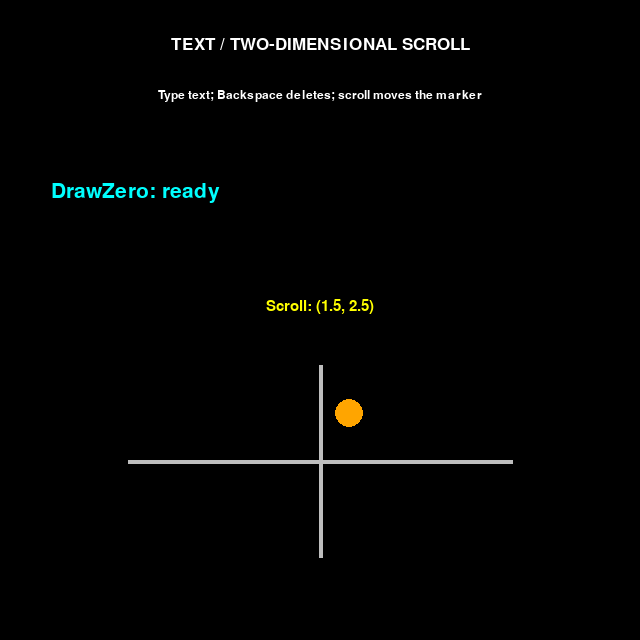
    text(C.white, 'TEXT / TWO-DIMENSIONAL SCROLL', (500, 70), 40)
    text(C.white, 'Type text; Backspace deletes; scroll moves the marker', (500, 150), 28)
    text(C.cyan, value, (80, 300), 48, '<.')
    text(C.gray, composition, (80, 370), 36, '<.')
    text(C.yellow, f'Scroll: ({scroll_x:.1f}, {scroll_y:.1f})', (500, 480), 36)
    line(C.gray, (200, 720), (800, 720))
    line(C.gray, (500, 570), (500, 870))
    filled_circle(C.orange, (500 + 30 * scroll_x, 720 - 30 * scroll_y), 22)
    tick(fps=60)
99_errors.py
import os
import traceback
import sys

os.environ['EJUDGE_MODE'] = 'true'

from drawzero import *

# filled_circle('boo')
# line('nocolor', (100, 100), ('asdf',))
# circle('red', (100, 100), 'asd', line_width=0)
# filled_rect('yellow', (250, 350, 50, 100))  # tuple[x,y,w,h] is also OK


class ExceptionPrinter:
    def __enter__(self):
        pass

    def __exit__(self, exc_type, exc_value, exc_traceback):
        if exc_traceback:
            traceback_len = 0
            cur = exc_traceback
            while cur:
                traceback_len += 1
                cur = cur.tb_next
            print(f'Traceback is {traceback_len} deep')
            print(''.join(traceback.format_tb(exc_traceback)), end='')
            print(exc_value)
        return True


# import drawzero
# print(help(drawzero))
# exit()
#
#
s = ExceptionPrinter()

with s: line('nocolor', (100, 100), (200, 200))
with s: line(C.red, (100, 200), (200, 'baz'))
with s: rect('violet', (100, 200, 300, 'baz'))